What is Desde?
Desde is two apps for runnable prototypes. A local editor that changes real source code, and a self-hosted app for review.
Desde is for teams whose prototypes are real running front-end apps rather than design files. It gives you two things. A local tool for changing that prototype by pointing at it, and a self-hosted app for putting it in front of teammates and collecting their comments.
They are separate apps. Neither one needs the other, and you can use either on its own.
Editor#
Editor is an app you run on your own computer, against a copy of your prototype's code. It starts your prototype's own dev server, shows the running app in a panel, and lets you select an element, inspect it, change it, or describe the change in chat.
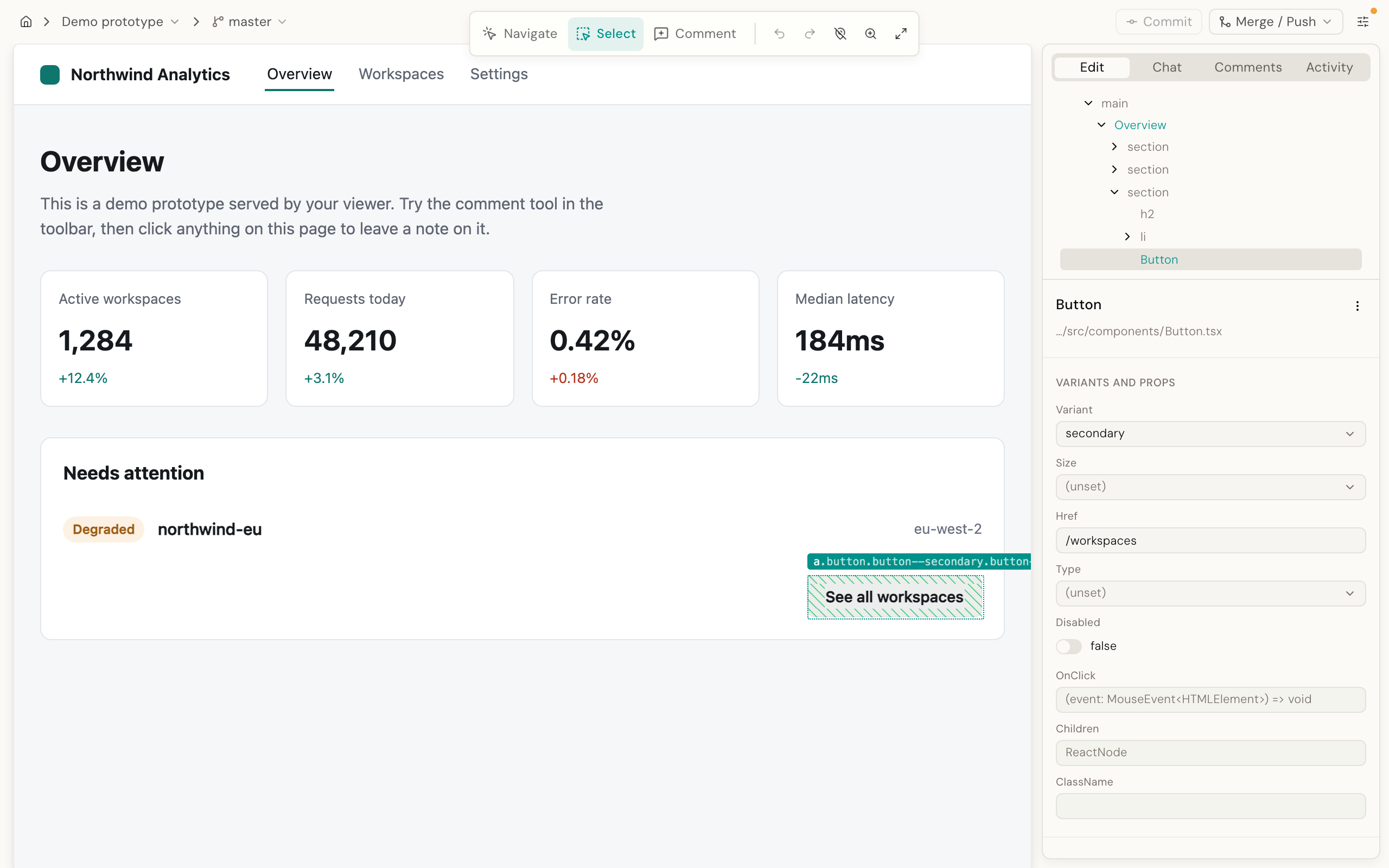
Every change is written into your source files as an ordinary edit, not yet saved to git. It is the same thing you would see if you had typed it in your own code editor. You commit it with git when you are ready.
Selecting, inspecting and making a direct change all work without a network connection. The AI features, cloning a repository, reading a design system and syncing comments to a Viewer all need one.
Start with the Editor quickstart.
Viewer#
Viewer is a web app you host yourself, for your whole team. It connects to a GitHub repository, builds the prototype, and puts it at a URL your teammates can open. It wraps the prototype in review tools: comments pinned to specific elements on the page, replies, mentions and email notifications.
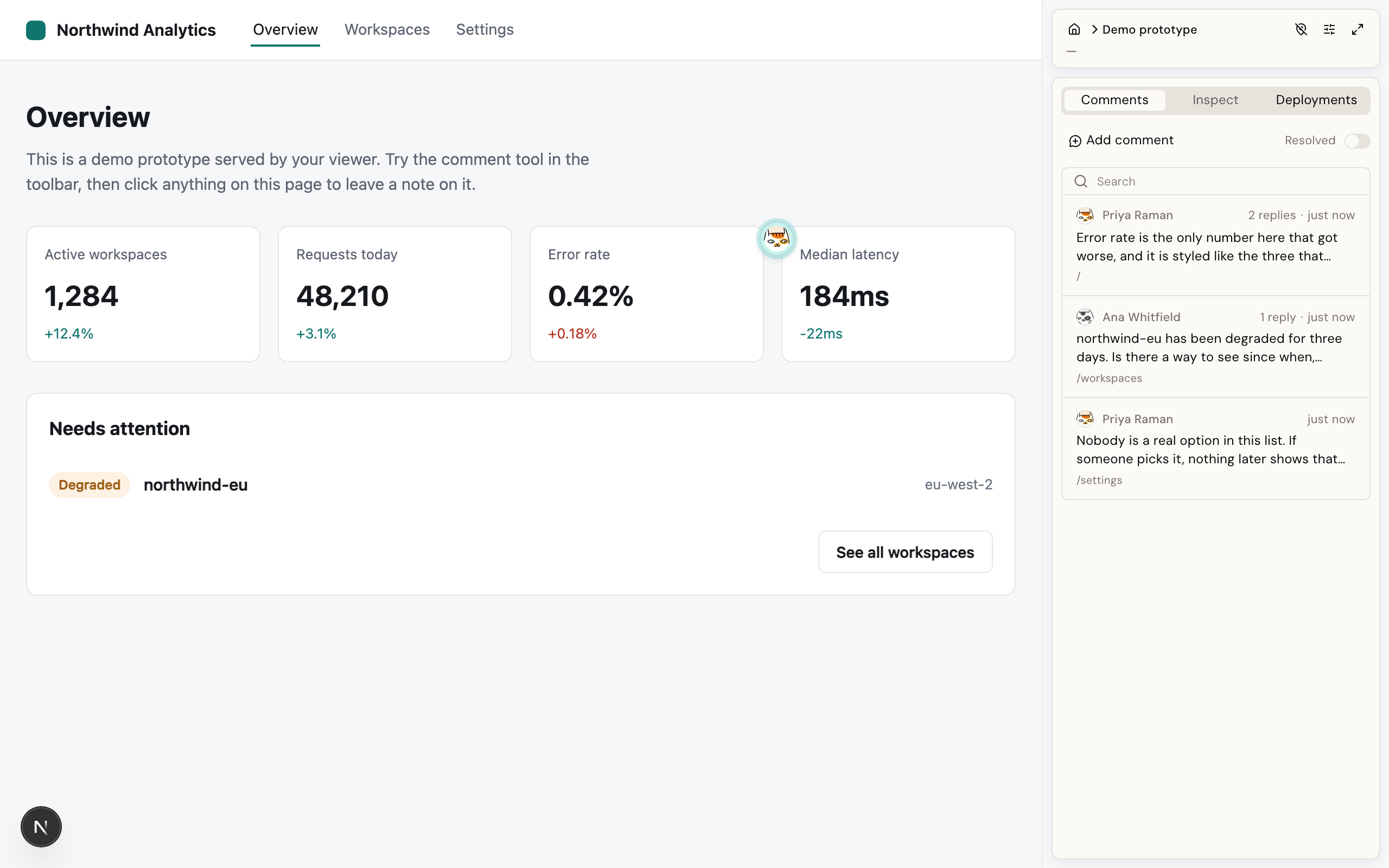
Reviewers sign in and leave feedback without touching your computer. Comments survive a layout change, because they anchor to the element rather than to a position on screen.
One command gets you a Viewer running on your own machine with a demo prototype already in it. Start by trying the Viewer.
Which one do you want#
If you are the person who would fix the thing being complained about, you want Editor. If you are the person doing the complaining, you want a Viewer link from whoever set it up.
| Editor | Viewer | |
|---|---|---|
| What it is | An app on your computer | A web app you host for your team |
| Where it runs | Your own computer | A server your team can reach |
| Who it is for | The person making changes | Everyone reviewing them |
| What it shows | Your prototype's live dev server, updating as you go | A built version of one specific commit |
| What it changes | Your prototype's source files, directly | Nothing. It never changes your prototype's source |
Using both#
The working loop is: edit in Editor, commit and push, let Viewer build the pushed commit, and collect review comments there. Then bring the feedback back into Editor for the next round.
The problem it solves#
A prototype that already runs is usually 80% done. The remaining 20% is polish. The label is wrong, the spacing is off by one step, this card should use the outlined variant, that empty state needs a different tone. Doing that work in a design file means redrawing something that already exists. Doing it in code means a round-trip through an engineer, or through a file tree you did not write.
Editor closes that loop by making the running prototype the thing you point at, while keeping the output production-shaped: components from your design system, options your engineers already use, code your team can read in a pull request. Nothing is exported or translated afterwards, because the source is what you edited.
What makes it different#
Most visual editors either write inline styles onto whatever you clicked, or ask an AI to guess which line of source to change. Desde does neither by default.
Desde reads your design system's own component definitions directly. So the sizes, variants and settings it offers you are the real ones your engineers can already use, never a list someone typed in by hand. Because it knows exactly which option in the source produced what you see on screen, most changes are written straight into that source with no AI involved. That makes them instant, exact, and readable in a pull request. An AI is asked to help only for the cases a direct change cannot handle safely, such as a value defined somewhere else entirely.
Read more in design-system grounding and deterministic editing.
Where this is today#
Warning Desde is in beta. It runs daily against a real prototype, and the core flows work. Expect rough edges. Nothing is published to npm yet. The Editor's desktop app is on the releases page; both apps also run from a checkout of the Desde repository.
Concretely, as of 2026-08-31:
- Editor edits Vue 3 and React source. It starts the dev server for you on plain Vite, Nuxt, React Router and Next.js. Astro works but is off by default. SvelteKit, Svelte, Angular, webpack and Create React App are not supported.
- Editor is single-user, on one machine. It has no accounts and no multiplayer.
- A macOS desktop app (Apple silicon) is signed, notarized and published on the releases page.
- The canvas and screenshot-plan features are off by default.
- Viewer has not yet been used by a team outside the project.
Full details in Editor limits.
License#
Desde is licensed under AGPL-3.0-or-later. You can self-host it, modify it, and use it commercially.
The one thing that AGPL adds on top of a normal open-source license is the network clause. If you run a modified copy and let other people use it over a network, you have to make that modified source available to them. This matters most for the Viewer, since hosting it for your team is exactly that case. Running Desde unmodified does not trigger this.
This is not legal advice. Read the full license text for what it actually requires.
Where to go next#
- Ready to install the Editor: Editor on your Mac
- Curious what the Viewer is like: Try the Viewer
- Ready to host the Viewer for your team: Deploy the Viewer
- Want the mental model first: How it works
- Unfamiliar term: Glossary