Quickstart
Editor and Viewer together
Connect a repo you are authoring in the Editor to a Viewer project so comments are shared, and understand exactly what does and does not sync.
The Editor and the Viewer are two separate tools that share one narrow seam: comments. Connect a repo to a Viewer project and comments you leave while authoring appear in the Viewer's review page, and comments reviewers leave there appear in the Editor.
Everything else stays where it is.
They are used one after the other, not at the same time#
The Editor runs a live dev server against your working tree and edits source as you click. The Viewer serves a built copy of your prototype from a past commit and wraps it in review tooling. They point at different things, and nothing tries to reconcile them.
The normal loop is sequential:
- Author in the Editor. Edits land in your working tree on the branch you have checked out.
- Commit, and publish the branch.
- Build in the Viewer, or let a push webhook do it.
- Reviewers comment in the Viewer.
- Come back to the Editor, read their comments, and author again.
Running both against the same prototype simultaneously is not supported and not useful: you would be reviewing a build that no longer matches the source you are editing.
What actually syncs#
| Syncs | |
|---|---|
| Comments | Yes |
| Notes | No (local to the repo) |
| Canvases | No (local to the repo) |
| Screenshot plans | No (local to the repo) |
| Chat sessions | No (local to the machine) |
| Edits, branches, commits | No (that is git's job) |
Canvases and screenshot plans are behind a switch that is off by default: editor.canvas in .desde/config.json, or EDITOR_CANVAS=1. On a stock Editor there is nothing there to sync in the first place.
When a repo is not connected to a Viewer, Editor comments are written to .desde/comments.json in the repo and the UI shows a local-only badge. When it is connected and this machine holds a token, they go to the Viewer instead.
Before you connect#
You need three things:
- A Viewer running and reachable, with a project you own. See run the Viewer: the project creation step there matters, because a project created the wrong way is one you cannot manage.
- The Editor running against your repo. See run the Editor.
- A write-scoped access token from that Viewer.
Note The Editor cannot create a Viewer project. The connect dialog lists projects that already exist and lets you pick one; if the list is empty it tells you to create one in the Viewer first. Do that step in the Viewer.
Connect#
1. Mint a write-scoped token in the Viewer#
Open the Viewer, go to /settings, and create a personal access token with the write scope ticked.
The scope matters, and the Editor checks it before storing anything. The Viewer's token form defaults to read-only, and a read-only token would let the Editor read comments but fail on every write with a 403: a connection that looks healthy and cannot do the one thing it exists for. The Editor refuses that token at connect time and tells you to make a new one.
The token looks like dsv_<id>_<secret> and is shown once. Copy it.
2. Open the connect dialog in the Editor#
In the Editor's top bar, open the project menu (the project name in the breadcrumb) and choose Connect to viewer…, or Change viewer… if this repo is already pointed somewhere.
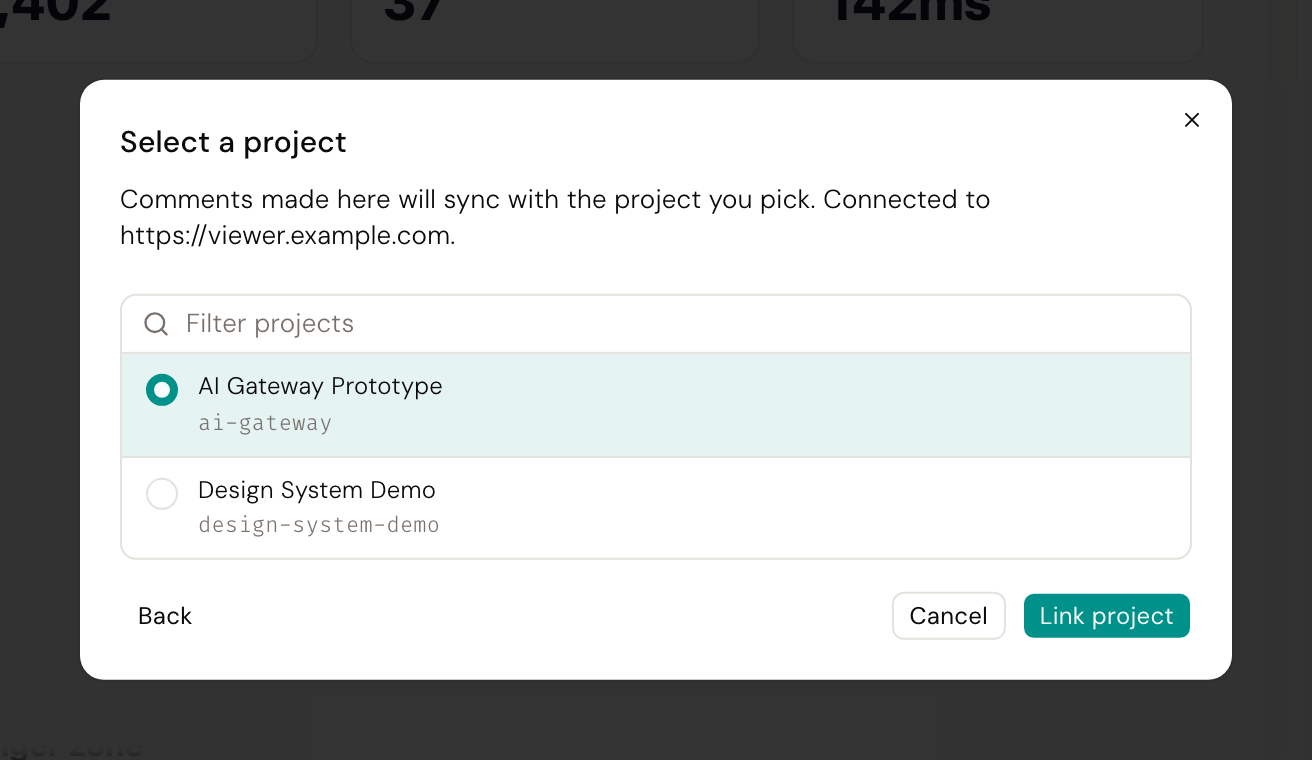
3. Paste the URL and token, then pick a project#
Enter the Viewer's URL, for example http://localhost:3100, and paste the token. Choose Find projects.
That runs a probe: the Editor's own process contacts the Viewer with the token, checks the token's scopes, and lists the projects it can see. The token is used and discarded at this stage. Nothing is stored until you pick a project. Each failure gets its own message, because the fixes differ: an unreachable URL, a rejected token, a read-only token, and a Viewer with no projects are four different problems.
Click a project in the list. That stores the token and writes the link.
Where things are stored#
The token goes to ~/.config/desde/viewer-tokens.json, with file mode 0600 in a directory created with mode 0700. It never enters the browser page and it is never committed. The file is keyed by Viewer origin, so you can hold tokens for more than one Viewer (a team instance and a local one) without them overwriting each other.
The link goes into your repo, at .desde/config.json, merge-preserving:
{
"version": 1,
"projectSlug": "acme-checkout",
"projectId": "…",
"platformBaseUrl": "http://localhost:3100"
}This file is meant to be committed: it is the repo's identity, so a teammate who clones the repo and runs the Editor is pointed at the same Viewer project without configuring anything. Their token is still their own, on their own machine.
Once linked, the project menu's Open in viewer goes to <platformBaseUrl>/review/<projectSlug>.
How the token stays out of the browser#
The Editor UI never sees the token. Comment traffic goes to a proxy inside the Editor's own process, which attaches the token server-side and forwards the request.
The proxy is deliberately narrow. It forwards only to the one configured Viewer origin, only to paths under /api/v1/, and only to the one configured project id, so even though the token has permission to reach other projects on that Viewer, the proxy cannot be used to. That keeps the proxy's authority a strict subset of the token's.
Limits worth knowing before you rely on it#
The Editor cannot trigger a build or read deployment status. Nothing in the Editor calls the Viewer's build or deployment routes. Builds are started from the Viewer's review page, or by a push webhook. To see your latest work in the Viewer, commit and push, then build there.
The Editor polls about every five seconds; it does not stream. The Viewer pushes comment changes over a live stream to its own review page, but a browser cannot attach an authorization header to that kind of connection, and the Editor's traffic goes through the bearer-gated proxy. So the Editor polls instead. A comment posted in the Viewer shows up in the Editor within a few seconds, not instantly.
One Viewer and one project per repo. .desde/config.json holds a single platformBaseUrl and a single projectId, and the proxy enforces that one project. Connecting again replaces the link rather than adding a second one.
Comment authorship is decided by the Viewer. When comments are syncing, the Viewer derives the author from the access token, not from what the Editor sends. Comments you make appear under the account that minted the token.
Offline, or with no token, the Editor falls back to local comments. If the repo is linked but this machine has no token, the Editor says so specifically rather than showing the plain local-only badge: the fix is to paste a token, not to ignore it. If you are offline, comments are written to the local file instead.
If something goes wrong#
- "That token was rejected." The token is revoked, or it belongs to a different Viewer. Tokens are stored per origin, so
http://localhost:3100and a remote URL are separate entries. - "That token is read-only." Mint a new one with the write scope ticked. Scopes cannot be changed after minting.
- "No projects on that viewer." The token is valid but the account it belongs to can see no projects. Create one in the Viewer: see run the Viewer.
- "Could not reach a viewer at …" The URL is wrong or the server is not running. Include the scheme.
- Comments appear in the Editor but not in the Viewer. Check the sync badge in the Editor. If it says local-only, the repo is not linked or this machine has no token.
More in troubleshooting and annotations.