Desde

Quickstart

Editor quickstart

Get the Editor running against your own prototype, and make your first source edit.

The Editor runs on your machine. You point it at a prototype repository, it starts that repository's own dev server, and it opens a workspace in your browser where you can click an element and change it. Every change is written straight into your source files.

By the end of this page you will have the Editor running against your own repo and one prop edit visible in git diff.

What your prototype needs#

Two things, and they are about your repository rather than about Desde.

A prototype that already runs, in a git repository. The Editor does not build your app. It starts your dev server with a few plugins added in memory, and it edits the working tree of whatever branch you have checked out. If npm run dev does not already work in that repo, fix that first. Your own node_modules must be installed, because the Editor loads and executes your config in order to merge its plugins into it.

Vue 3 or React. Those are the two the Editor can edit. Underneath them it starts plain Vite, Nuxt, React Router or Next.js for you, with nothing to configure. Astro works but is off by default. SvelteKit, Svelte, Angular, webpack and Create React App are not supported.

The full gate, and what each refusal means, is in the repository gate below.

Getting the Editor#

Desde is pre-release. There is no public download and nothing is published to npm, so both paths below start from a checkout of the Desde repository. Which one you want depends on whether you would rather run a Mac app or a terminal command.

The desktop app#

The Editor also ships as a macOS app. It is signed and notarized, and it needs far less of you than the command-line path does: it carries its own Node runtime, and it downloads the claude binary that powers chat by itself on first launch. Node, npm and the AI runtime all stop being your problem.

Warning The desktop app has not been released yet. There is no download link. Building a signed copy needs an Apple Developer ID in your own keychain, so today this path is for people working on Desde itself. Everyone else wants the command line below.

From a checkout, with the dependencies from the next section installed:

npm run package:desktop

Windows and Linux builds do not exist yet.

The command line#

This path needs git and Node 22.12 or newer on your machine. Check with node -v.

Clone the monorepo:

git clone https://github.com/mochang/prototools.git

Install the root dependencies:

cd prototools && npm install

Install the CLI's own dependencies. The CLI has a separate node_modules. The root install does not cover it, and the CLI's launcher script looks for its TypeScript loader there specifically.

npm --prefix editor-cli install

Build the editor's own interface bundle:

npm --prefix editor-cli run build:ui

That last step is not optional on a fresh clone. editor-cli/ui-src/dist is gitignored, so it does not arrive with the checkout, and the CLI refuses to start without it. The build reads shared React components from the monorepo's root src/, which is why the root install has to come first.

Note You do not need to build the bridge. The bridge is the small script the Editor injects into your prototype so it can highlight and read elements. Its bundle at dist/bridge-bundle.js is committed to the repository, so npm run build:bridge is only needed if you change bridge source yourself.

Start the editor#

From the Desde checkout, pass the path to your prototype:

node editor-cli/bin/desde.mjs ../my-prototype

The path can be relative or absolute. The terminal prints something close to this:

[editor-cli] branch mode: editing the current working tree in place at /Users/you/my-prototype (no worktree, no auto-commit)
▸ Vite running at http://127.0.0.1:5173
▸ Editor UI ready at http://127.0.0.1:4321
▸ Bridge version 2026-09-01a-callsite-edit-target
▸ Orchestrator: SDK (CLAUDE.md loaded natively)
▸ Smoke check passed (bridge tag + data-desde-src present in served output)

Your browser opens at the editor URL on its own. If it does not, open the printed URL yourself.

Warning Use the exact URL that was printed, host and all. The editor's API rejects any request whose Origin header is not exactly http://127.0.0.1:<port>. Visiting http://localhost:4321 instead loads the page but makes every action fail with a 403.

What the boot actually does#

It checks your framework first, before anything slow starts. It reads your package.json for a vue or react dependency. If Vue and React are both present, Vue wins. A Vue major other than 3 is refused outright. It does not require Vite, and it does not require a Vite config: which dev server to start is a separate question, answered after this one.

It starts your dev server, not its own. The Editor loads your Vite config, merges in a handful of plugins (five on a Vue repo, two on a React one), and runs the result. Two of them matter here: one injects the bridge into the served HTML, and one stamps a data-desde-src="file:line:column" attribute onto your elements so a click in the browser can be traced back to a line of source. Neither is ever written to disk. Your repository is untouched by the injection.

It picks two ports. The editor interface wants 127.0.0.1:4321 and your Vite server wants 127.0.0.1:5173. If either is taken (a second Editor is already running, or you already have a dev server up), it silently falls back to a free port the operating system chooses. This is why you read the URL off the terminal rather than assuming 4321.

Override either with --shell-port or --vite-port, and skip the browser launch with --no-open. Run with -h for the full list, or see the CLI reference.

The .desde directory#

A .desde/ directory appears in your repository the first time you use the Editor. It holds the Editor's own state: per-edit backups it uses for Undo, chat transcripts, extracted component manifests, and project configuration.

You do not have to add it to .gitignore. On boot the Editor appends .desde/ to .git/info/exclude in your checkout. That is a local ignore file: never committed, never visible to your teammates. Your git status stays clean.

What you see first, and what to click first#

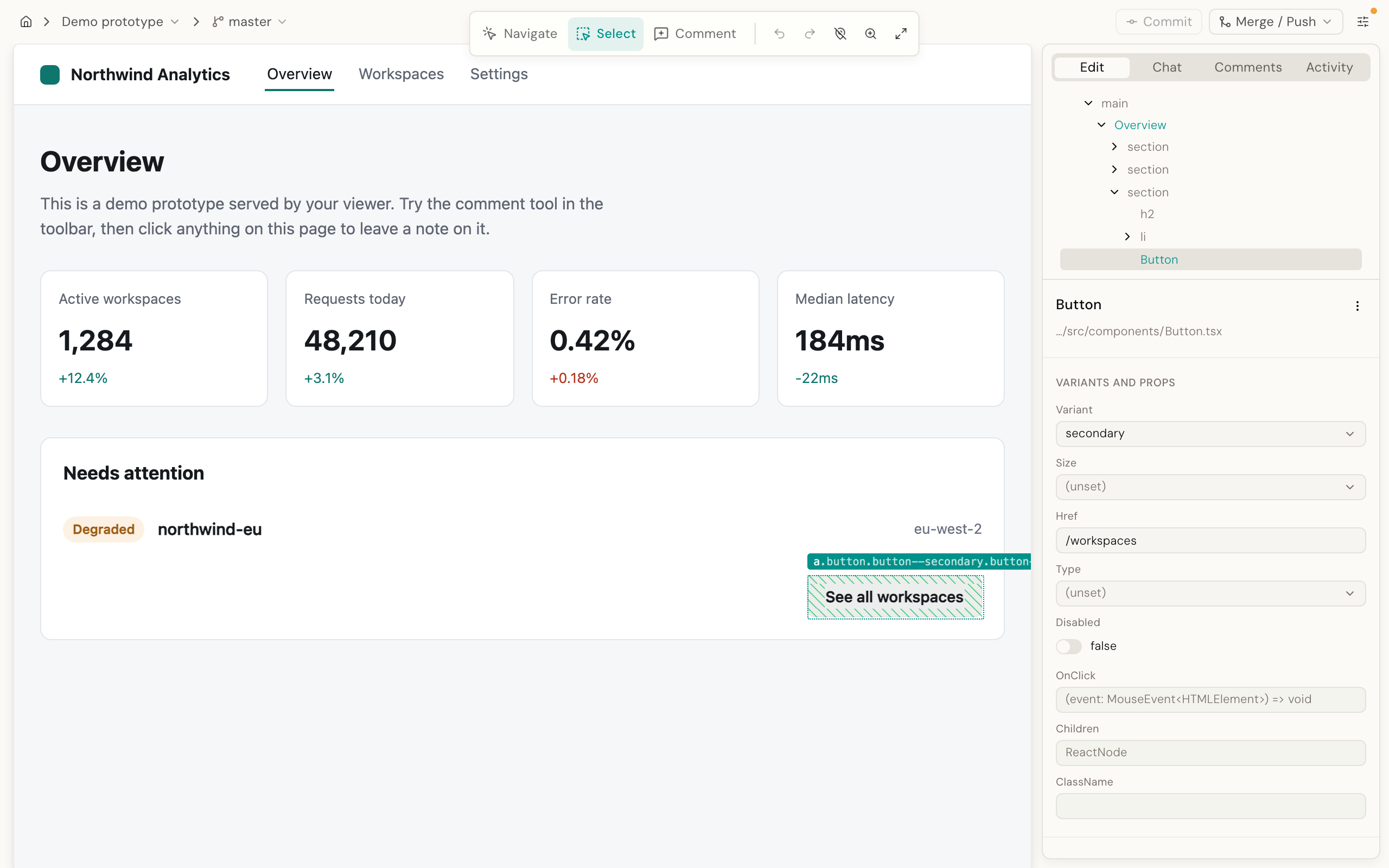
The workspace is your prototype running live on the left, and a rail on the right with four tabs: Edit, Chat, Comments, Activity. A small floating cluster hangs off the bottom edge of the header, holding a breakpoint menu and a three-way tool picker: Navigate, Select, Comment.

Warning Pick the Select tool before you try to select anything. The picker starts on Navigate, where clicks go to your prototype: buttons submit, links navigate, exactly as they normally would. On Select, clicks select the element instead. Nothing in the interface tells you this on first run: the Layers panel says "No elements detected." and the Inspector says "Select a component in the prototype to inspect it." Both are what you see on either tool.

Both tools are useful. Stay on Navigate to click through your prototype to the screen you care about, then switch to Select to start editing that screen.

Your first edit#

Open a second terminal in your prototype repository and leave git status ready there. You are going to watch a file change.

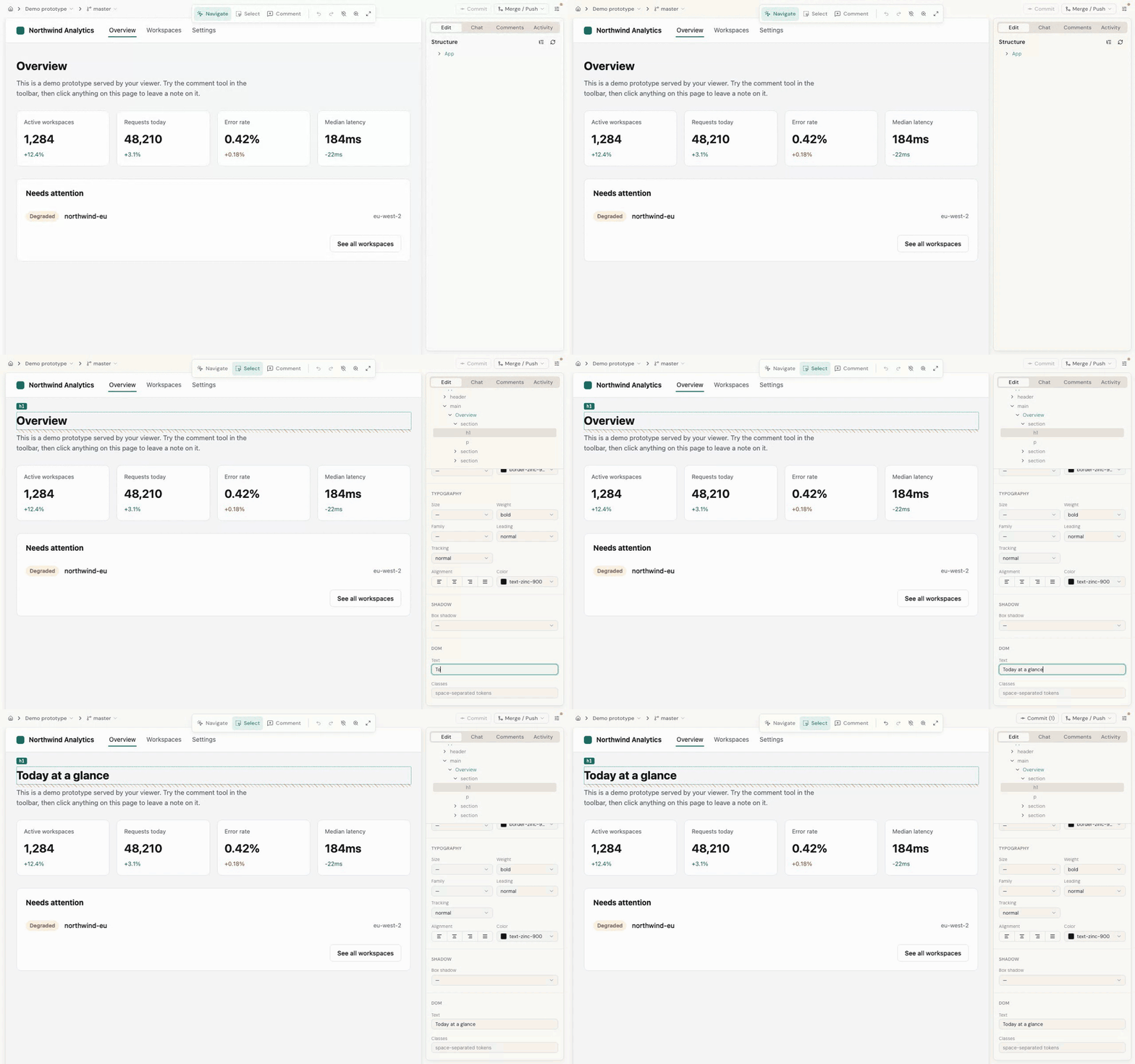
1. Navigate. On the Navigate tool, click through your prototype until you are on a screen with a button, a card, or any component you recognise.

2. Switch to the Select tool, then click that component. The Edit tab fills in: a Structure tree of the elements on the page at the top, and an Inspector for the thing you selected below it.

3. Find the props. In the Inspector, look for Variants and props. That section is built from the component's manifest (a description of its real props and their allowed values, extracted from the component library you installed), so a size prop with three legal values renders as three choices, not a free-text box. See design-system grounding.

If the component has no manifest, the panel says so and falls back to a Props section built from the values the component is actually running with.

4. Change one value. Pick a variant, or type a new string. There is no Save button and no staging area. The edit is written to your source file as you make it, and Vite's hot reload shows you the result in the same second.

5. Confirm it in git. In your second terminal:

git diff

You should see the change in the component's own source file, the same line you would have edited by hand. That is the whole point of the tool: the output is source code, not a description of an intended change.

To undo, use Undo in the header rather than git checkout. The Editor keeps its own per-edit backup journal. When you are happy, use Commit in the header. Your changes are ordinary uncommitted working-tree changes until you do, which means your own editor and your own git see them too.

Most prop edits never involve a language model. They are handled by splicing the new value into the exact source position the click resolved to. Only genuinely ambiguous cases escalate. See deterministic editing.

AI features and authentication#

The Editor uses a model in two different ways. As of today, they authenticate differently. This is worth understanding before you hit it as an error.

Chat, and the edit-repair mini-turn, run on the Claude Agent SDK. The SDK routes through the bundled claude binary and uses whatever credentials that binary is already configured with: a Claude subscription you logged into with claude and /login, or an API key if that is how you set claude up. If chat works for you in a terminal, it works in the Editor. Nothing extra to set.

Some other model-backed paths go through a separate provider registry, and that registry refuses to start without explicit credentials. It picks its configuration like this: if ANTHROPIC_API_KEY is set in your environment, it uses the API. Otherwise, if EDITOR_USE_CLAUDE_SUBSCRIPTION is set to 1, true, yes or on, it uses the same subscription path chat uses. With neither, it throws:

Missing ANTHROPIC_API_KEY. Set it to use Editor's AI features, or set
EDITOR_USE_CLAUDE_SUBSCRIPTION=1 to use the Claude subscription of the
bundled `claude` CLI (only appropriate when you are running Editor for
yourself. See the README).

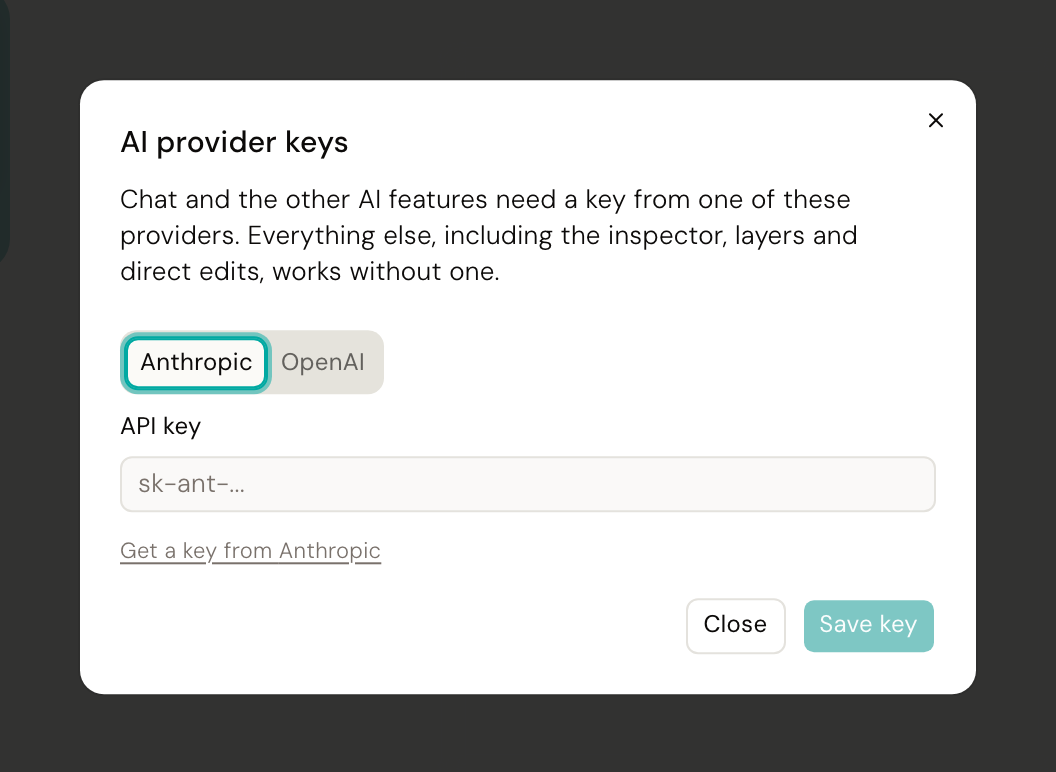
The easiest way to set a key is in the app. Open the settings gear in the editor's top bar and choose Anthropic API key. Desde checks the key with Anthropic before saving it, so a typo fails in the dialog rather than on your first chat turn, and the key takes effect immediately without restarting the CLI. It is stored in ~/.config/desde/llm-credentials.json with 0600 permissions.

If Desde finds no credentials at all when it starts, it opens that dialog for you. You can dismiss it: the inspector, layers tree, direct edits, comments, Commit and Publish all work with no model configured. A marker stays on the gear until a key is set.

An ANTHROPIC_API_KEY in your environment always wins over a stored key, and the settings panel says so rather than offering controls that could not work. To manage the key in the app, unset the variable.

Note If you run Desde as a desktop app rather than from a terminal, the settings gear is the only way to supply a key. A macOS app launched from Finder or the Dock inherits launchd's environment, not your shell's, so an export in ~/.zshrc never reaches it.

Warning These two lanes disagree, and the inconsistency is real. Chat can be working perfectly while a different action in the same session fails with Missing ANTHROPIC_API_KEY. The paths behind the registry include the language-model edit lane the commit dialog can fall back to, hint generation, and goal verification. If you see that error, set one of the two variables and restart the CLI.

The refusal is deliberate rather than a bug: routing silently to a personal Claude subscription is a decision someone should take on purpose, so it requires an explicit flag.

To set one for a single run:

EDITOR_USE_CLAUDE_SUBSCRIPTION=1 node editor-cli/bin/desde.mjs ../my-prototype

The repository gate#

The Editor checks your repository early in boot. All of the following must be true.

  1. It is a git repository. The Editor edits your working tree in place and relies on git for branches, publishing, and safety checks. See branch mode.
  2. package.json exists at the root and parses.
  3. It declares vue at major version 3, or react. Any of dependencies, devDependencies or peerDependencies counts.
  4. Its own node_modules are installed. The Editor loads and executes your config in order to merge its own plugins into it. If the config imports a plugin that is not installed, the boot fails.

That is the whole gate. It says nothing about your bundler, because which dev server to start is a separate question answered after it. See hosts. A repository the Editor cannot boot in-process is not refused here. It is offered attach mode instead.

Warning On the plain Vite path a config named vite.config.mts or vite.config.cts is not detected, even though Vite itself accepts those names. Rename the file to vite.config.ts if you hit this.

If both Vue and React are present, Vue wins. The Editor stamps source positions onto elements at build time, and that stamping is framework-specific. One plugin handles Vue single-file components, another handles JSX. When a repository declares both, it is treated as a Vue prototype.

Refusals#

When the gate fails, the Editor prints Repo not supported by Editor: followed by one message and stops. It does not partially start.

Reason What it means
no-package-json No package.json at the path you passed
malformed-package-json package.json is unreadable or is not valid JSON
missing-framework Neither vue nor react is a declared dependency
wrong-vue-major vue is pinned to a major other than 3. Vue 2 is not supported and is not planned

There are four, and every one is a statement about your repository. Two more used to sit here, missing-vite and no-vite-config, and they were statements about the Editor's own boot path rather than about your code. A repository with no Vite dependency still has somewhere to go, so it now gets a dev server or an attach offer instead of a refusal.

Three cases produce a warning and continue rather than refusing: a Vue range the Editor cannot read a major version from (latest, workspace:*, >=2.7.0 <4.0.0), React below 18, and Vite below 4. Ambiguity is treated as your call, not as a failure.

Separately, the Editor refuses to start when your repository has an in-progress git operation: a merge, cherry-pick, revert, bisect, or rebase. A half-finished merge leaves conflict markers in your files, and edits written on top of them would be unrecoverable. Finish or abort the operation first.

A dirty working tree and a detached HEAD are both fine. The Editor edits whatever you have checked out.

Exit codes for each of these are in the CLI reference.

Troubleshooting#

Editor UI bundle not found at …/editor-cli/ui-src/dist You skipped the interface build, or it failed. Run npm --prefix editor-cli run build:ui again (equivalently, npm run build:ui from inside editor-cli/) and read its output. If it fails on a missing import, the root npm install did not complete. The interface build pulls React and the shared components from the monorepo root.

Bridge bundle not found at …/dist/bridge-bundle.js Unusual on a fresh clone, since that file is committed. Run npm run build:bridge from the repository root.

Repo not supported by Editor: followed by a specific reason, and the process exits with code 3. The reason line tells you which check failed: no package.json, a package.json that cannot be parsed, a Vue major that is not 3, or no supported framework dependency (vue, react, or next). There is no override. The Editor cannot map clicks to source in a framework it has no source-tagging plugin for. See limits.

Could not read .git directory: … The path you passed is not inside a git repository. Run git init and make a first commit, or point the Editor at a real checkout. Branch mode has nothing to fall back on without git.

Canonical has in-progress git operations: merge (or rebase, cherry-pick, revert, bisect) You are mid-operation in that repository. Finish or abort it, then start the Editor. Editing a working tree that git is halfway through rewriting is not safe, so the Editor refuses rather than guessing. A dirty tree on its own is fine. Only in-progress operations are blocked.

Everything in the interface returns 403. You are on the wrong host. Use the 127.0.0.1 URL the CLI printed, not localhost. They are different origins as far as the browser is concerned, and the API checks the origin exactly.

The URL is not 4321. Another process holds that port, so a free one was chosen instead. Read the terminal. To insist, stop the other process or pass --shell-port.

Smoke check warning: on boot, with the interface still up. The Editor served your app but did not find the bridge tag or the data-desde-src stamps in the output. The workspace will load and edits will probably fail. The usual cause is a Vite config that overrides or strips injected plugins. Note the check reads markup only. A strict Content-Security-Policy that blocks the injected script can let the check pass while the bridge never runs.

Chat replies with an authentication failure. The message is explicit: your local claude credentials look expired or invalid. Run claude, then /login, then start a new chat turn.

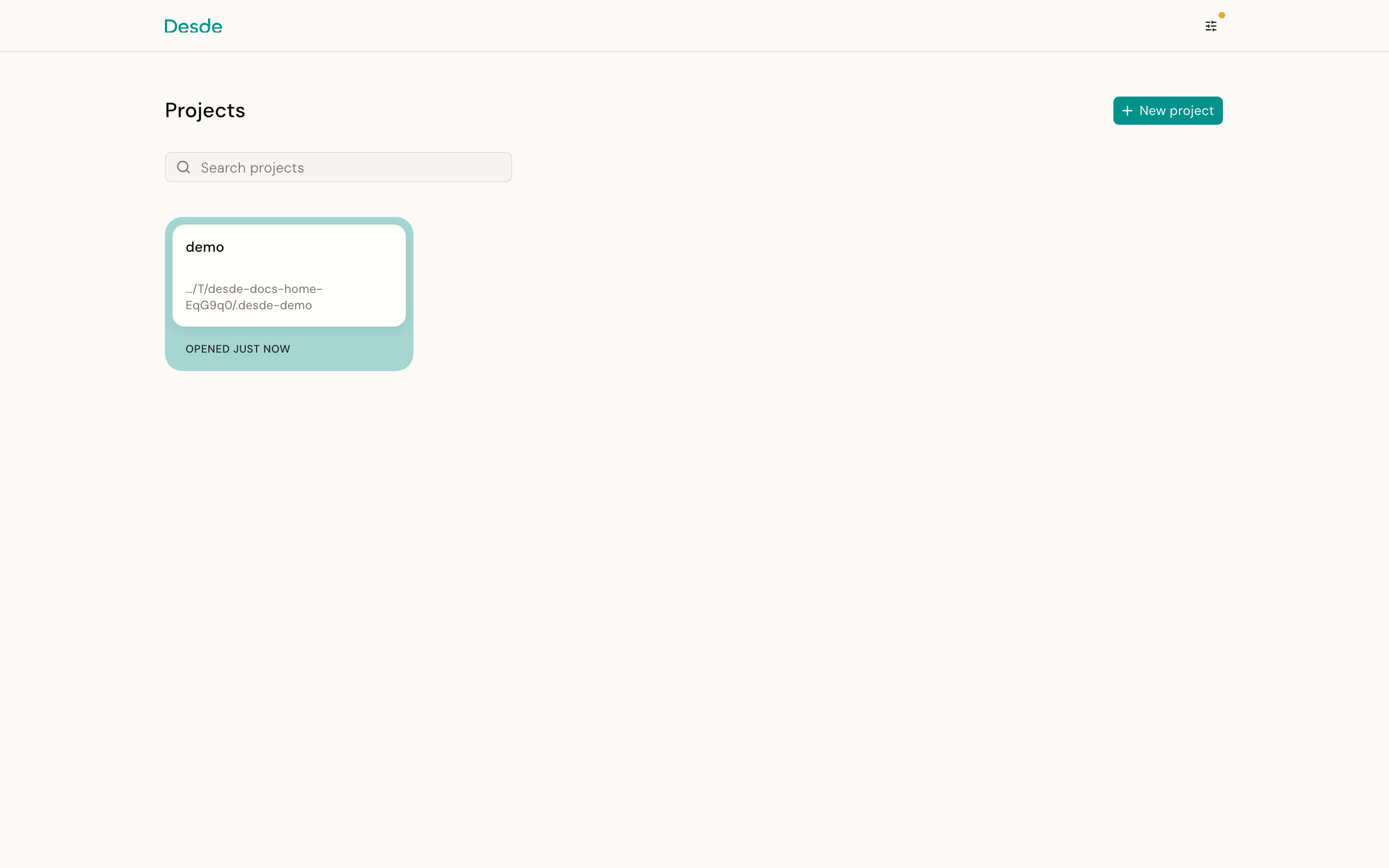
You ran the CLI with no repository path. That is not an error: it opens a launcher page instead, where you can pick a recent project, open a local folder, or clone from GitHub. Pass a path to skip it.

Next steps#

  • Tour the workspace: the header, the four rail tabs, and what each one is for.
  • Select and inspect: layers, breakpoints, and what the Inspector is telling you.
  • Editing: props, text, classes, and what happens when an edit is refused.
  • Branch mode: why there is no Save button, and where Commit and Publish fit.
  • Chat: using the agent against your own design system.
  • Limits: what the Editor does not do yet.
  • Glossary: bridge, manifest, applicator, source tag.